data<-read.csv("data/ButterflyData.csv", stringsAsFactors = T)Introduction
r-basics
quarto
projects
data-exploration
probability
This section will introduce you to
Program R
Projects
Quarto
Models
We will also discuss multiple important concepts!
Note
If you have taken a similar introductory statistics course before, some of the activities and assignments in the first few sections may seem familiar. That is OK. Take this as a chance to reinforce the knowledge before moving into different topics.
Welcome
Important
If you are reading this file on your own, it may not make a lot of sense at first. That’s OK. We will work through the material together, and you will learn more about R as you go.
Before we get into the weeds of data analysis, coding, and R, we should remember some basics. If you have a lot of experience in R, just hang in there, we will get into more complex topics as we go. If you’re brand new, also hang in there, this may seem overwhelming and very time consuming. It will get easier.
We will figure out theory and coding as we go. For all assignments, we will use Quarto. It allows you to write some neat reports while using code and plots.
R Projects
We will learn more about projects as we go. For the time being, let’s do the following:
Open R Studio, go to file > new project > new directory > new project
Name it SNR610, and use a directory that makes sense to you
Download the SNR610_W1_notes.qmd and the .csv files into the newly created project directory
Important
If you are working on this as a reference exercise, you can stop here for now
Statistics refresher
Open R and make sure the SNR 610 project is open. Then open the SNR610_W1_notes.qmd file in R and continue there.
First, we will discuss some topics.
I want you to take notes in the .qmd document
What is statistics?
What is a population and a sample? Give examples
Data
Variable and observation
Types of data:
Categorical: Nominal and Ordinal
Numerical: Discrete and Continuous
Now, let’s go back to the html file and follow the instructions to explore some different types of data.
Data exploration
Download and read the butterfly file.
If you are comfortable with R basics, you can write the code for this exercise directly into Quarto. To add extra code chunks, write this symbols: ```{r}, if you are not comfortable with R, I recommend for the time being you open a new file and copy and paste the code there, and run it}
To read data, we use the following line:
This only works if the file is in the current working directory. Make sure you download the file to the projects folder!
Let’s look at some of the data, the head command shows us the top 5 rows:
head(data) X Species Status Nparasites ForewingArea
1 1 Viceroy 1 2 964.8420
2 2 Monarch 3 0 1064.9463
3 3 Viceroy 2 2 1087.6290
4 4 Viceroy 2 3 1025.4572
5 5 Monarch 2 1 986.7462
6 6 Viceroy 2 2 1029.7973So, we have data on three types of butterflies: Viceroy, Monarch, and Queen:
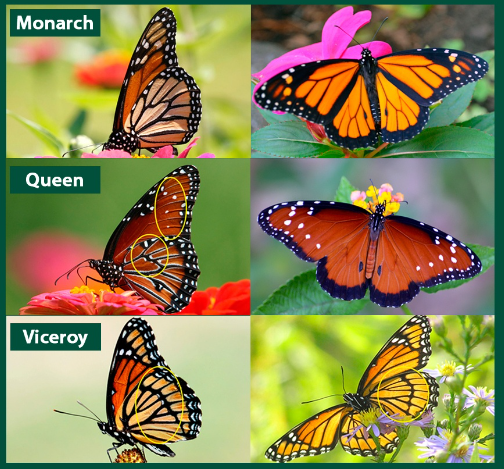
We have data on forewing area, number of parasites, species, and status. For status we have numbers 1, 2, and 3, which represent the following:
1: poor
2: OK
3: Good
What types of variables are there? Identify each variable type. What are the variables and what are the observations?
Let’s look at the structure of the file:
str(data)'data.frame': 134 obs. of 5 variables:
$ X : int 1 2 3 4 5 6 7 8 9 10 ...
$ Species : Factor w/ 3 levels "Monarch","Queen",..: 3 1 3 3 1 3 1 3 3 1 ...
$ Status : int 1 3 2 2 2 2 3 2 2 2 ...
$ Nparasites : int 2 0 2 3 1 2 1 4 1 3 ...
$ ForewingArea: num 965 1065 1088 1025 987 ...Note that this data is a bit messy. We will learn how to clean data later in the book, but this is closer to what your data will look like initially!
What is a factor?
Should any other variable be a factor?
data$Status<-as.factor(data$Status)What is a factor?
str(data)You can look at the whole dataset using the following:
print(data)Look at the data. Do you think there is an effect of # of parasites on wing growth? Do you think different species have different sizes? How can we tell?
Inferential statistics
We can use inferential statistics to answer these questions! But why? What are inferential statistics, and what is special about inferential statistics? Discuss
Thoughts:
More on that in a later section.
Plotting
Look at the data. Usually the best exploratory analysis is a visual one. We will learn about plotting during the course. We will learn about good plots, bad plots, and how to use R and ggplot to make some publication level plots.
For the purposes of this exercises, I want you to think about what type of plot you ant to make, and attempt to make it. You can use R, you can use excel, you can try to draw it. You can work in teams, but try to work mostly by yourself. We will revisit this dataset at the end of the course, and you will plot it again. Hopefully this will show some of the learning you have obtained!
Probability
To understand inferential statistics, we need to understand probability.
Discuss and write a definition for probability:
What is a probability distribution? Give one example
This is your file now!
Go to the top of the file, and replace the “author” name for yours. Try to Render the file, it will hopefully work and have all your notes :)
Next steps
Continue practicing R, projects, and Quarto.